Chat bubble
Every pageApp embed · site-wide
The corner bubble. A shopper opens it anywhere and asks a product, a size, a policy, an order.
Opens itself once a visit on desktop; on a phone, when tapped.
Product
Five storefront blocks and a six-screen console, all answering out of the same catalogue, stock and rules.
Counted from the code
5
storefront blocks: four theme blocks plus the chat embed.
12
tools the assistant can reach, each with a switch.
4
settings per tool: open, confirm first, hand over, off.
Each count is taken where it lives: blocks from the theme app extension, tools and settings from the permission model. A measured store result is a different number.
Storefront
You place them one at a time, from your own theme editor.
App embed · site-wide
The corner bubble. A shopper opens it anywhere and asks a product, a size, a policy, an order.
Opens itself once a visit on desktop; on a phone, when tapped.
Section block · product template
A question module in the product page, with prompts written for it.
A prompt it would stumble on is dropped before render.
Section block · search results
Above your own results, catching searches that end empty: a barcode, another language, a typo, a sold-out item.
Six steps against your data: zero model cost, zero wait.
Section block · your chosen spot
An ask bar you drag where you want: Section → Add block → Apps.
It hands the question to the bubble; the answer appears there.
App block · product template
What goes with this one, out of your own complementary-product settings.
Five visible settings; a sold-out item stays out.
Your throttle
Merchants asked for a throttle before a cleverer bot, so the switch sits on the capability.
Open
So most ship here: catalogue search, your real rules, a shopper’s own order. Each is a read against your store, logged with its call.
Confirm first
A return request, a restock signup, a saved profile. The assistant needs a plain yes first, and that yes is in the transcript.
Hand over
The assistant gathers what the request needs and passes the thread over. One conversation for the shopper; the decision stays yours.
Off
The tool leaves the list, so it stops being offered. One capability sits outside this switch: handing over to a person, always available.
Console
Every question the storefront took shows up here, with the request out and the payload back.
Screen 1
What to do now, and how the period went. The order is decided on the server, so two people see one list.
Screen 2
Every conversation in one list, with folders. Each turn carries its calls.
Screen 3
Asked most, handed over most, and which conversations became an order. Each figure opens the inbox on that filter.
Screen 4
The review queue, built from questions Refik handed over. The shopper’s message sits beside the reply.
Screen 5
Tool settings, the places Refik appears, persona and greeting, and a private test area.
Screen 6
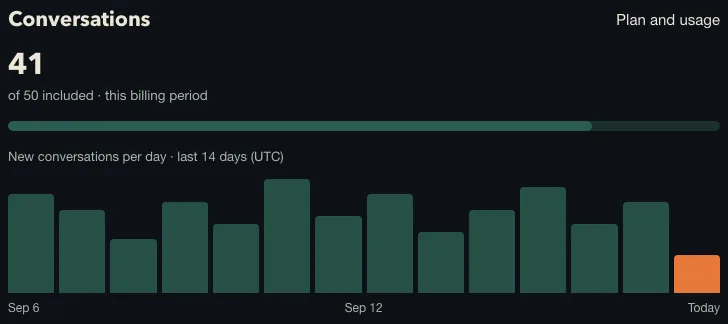
Conversations counted against your plan. The bill has an absolute top; yearly plans have a zero overage band.
Two more sit outside that menu: the setup wizard, and Team, where you invite the people who answer.
Setup
Voice
Both live in your theme editor, beside the colour and the mobile offset, and the console previews the widget live.
An answer you type is used as written. Publishing a draft means a person read the conversation and wrote the reply.
Actions
urun_ara
Barcodes, other languages, typos. Sold-out items stay out.
rutin_kur
Orders the steps, and fills the shopper’s table.
tamamlayici_getir
Lists pairings for one product, leaving that table alone.
politika_bilgisi
Your real rules, plus the policy page link.
siparis_durumu
A signed-in shopper’s orders and tracking link.
siparis_ara
A guest’s order, from number and email together.
sorun_coz
Usually a usage problem. This tries that first.
iade_talebi_ac
Opens the request. A person approves it in Shopify.
profil_kaydet
Keeps what they told you, in your pack’s fields.
ton_bul
Optional: “a bit warmer” becomes a shade you stock.
stok_haber_ver
Registers the address they gave, once they asked.
insana_devret
Complaints, damage, medical questions. Always on.
Trust
The list Refik asks for at install, read out of the app configuration.
Stack
Working
Catalogue, stock, orders, returns and policy pages, through the Admin API and the scopes above.
Working
A webhook keeps the knowledge base current as you edit products, so answers follow the live catalogue.
Working
The pairings you set in Shopify are what the routine block reads. Yours, in your order.
Working
Restock addresses go where your email already lives, so the follow-up is yours.
Evidence
A recorded session against a demo store. Under each turn: the signed request, the payload back, the status.
Three turns where the tools came back with what was asked.
Three turns that went to a person, each with the reason recorded.
Two turns where a call failed, and the reply named which part.
Five turned down at the door, before the engine ran.
Four doors stand between a visitor and the engine: a request signed by Shopify, a store that resolves to an installed tenant, an open maintenance gate, and a live plan or trial.
Judgement
Read what it says when unsure, check where each answer came from, and look at the questions it handed over.